

You probably already know the drill: your laptop loses ports faster than you lose socks, and you find yourself juggling HDMI cables, chargers and a USB stick like a low-budget circus act. Enter the Anker USB C Hub, a compact little brick that insists it is the solution to all your connectivity drama. For about $24.99 you get a 5-in-1 hub with a 4K HDMI output, a powered USB-C 5 Gbps data port and two powered USB-A 3.0 5 Gbps data ports, all packed into something the size of a thick bookmark.
This matters because you regain a pocket of sanity on your desk: one cable instead of five, a clear monitor connection and decent transfer speeds. Use it and you’ll spend less time untangling cables and more time doing whatever it is you actually bought the laptop for.
TL;DR
| Feature | Verdict |
|---|---|
| Overall | ⭐️⭐️⭐️⭐️ – Reliable, affordable and thoughtfully trimmed down to the essentials; great everyday hub for $24.99 |
| Ease of Use | ⭐️⭐️⭐️⭐️⭐️ ⏱️ – Plug-and-play. You plug it in and it mostly just works without drivers or drama |
| Performance | ⭐️⭐️⭐️⭐️ 🔌 – 5 Gbps data ports and 4K HDMI (30Hz) deliver consistent results for peripherals and external displays |
| Ports & Compatibility | 🎯 – HDMI, USB-C data and two USB-A ports cover MacBook Pro/Air, Dell, ThinkPad and most modern laptops |
| Value | 💸 – Excellent bang for your buck if you want core functionality without paying for fancy extras |
Anker 332 USB-C Hub

You plug this Anker USB C Hub into one USB-C port and suddenly your sad little laptop can do everything it should have been able to do in the first place. It gives you a 4K@30Hz HDMI output, a 5 Gbps USB-C data port, two 5 Gbps USB-A ports and a PD-IN port for pass-through charging so you can keep working while your battery behaves.
It’s compact, plug-and-play, and actually reliable for day-to-day use — perfect for your home office, a presentation day, or when you need to connect an external monitor and a handful of peripherals without turning your desk into spaghetti town. If you travel light, toss it in a pouch; if you’re desk-bound, it cleans up cable chaos.
You’ll probably want an extension cable though, because the attached lead is short and a bit stiff.
Pros and Cons
| Pros | Cons |
|---|---|
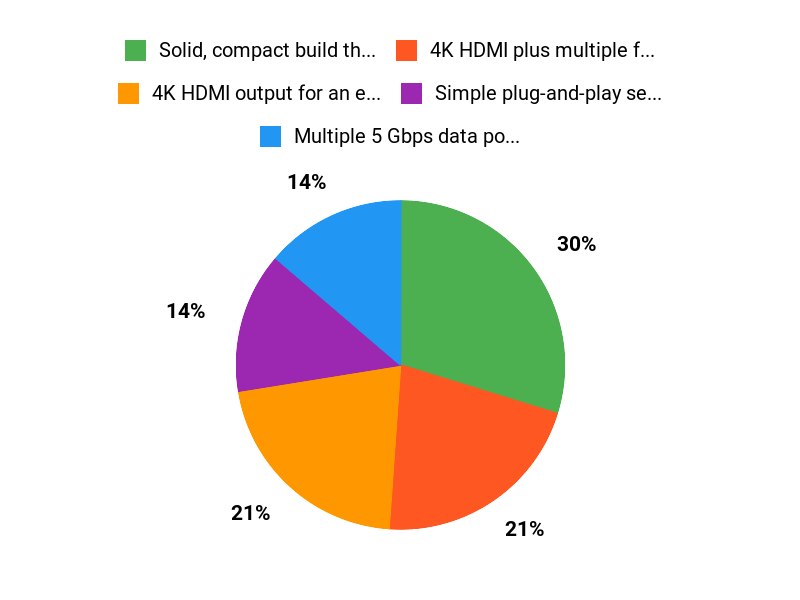
| ✅ Solid, compact build that’s easy to carry | ❌ Short, stiff attached cable can be annoying for some setups |
| ✅ 4K HDMI plus multiple fast data ports | ❌ Occasional HDMI connection drops reported by a few users |
| ✅ Simple plug-and-play setup with no drivers | ❌ PD-IN is for charging only and does not carry data |
| ✅ Good overall value and broad compatibility | ❌ No SD card slot or Ethernet port if you need those |
What People Say
People love that this Anker USB C Hub actually makes connecting a monitor and accessories painless. Reviews highlight the reliable 4K HDMI output, fast 5 Gbps ports, and simple plug-and-play setup. Common gripes are the short, stiff cable and occasional HDMI hiccups that a restart or update usually fixes.
Overall Sentiment: Positive

🗣️ Travis
Travis says it’s dependable: the 4K HDMI output worked flawlessly for his external monitor, the 5 Gbps USB-A ports made file transfers quick, and setup was just plug and play. He tested it on MacBook Pro, Dell XPS, and ThinkPad with consistent results.
🗣️ Alien Nomad
Alien Nomad calls it the Swiss army knife of connectivity: 4K HDMI (4K@30Hz), two 5 Gbps USB-A ports, a 5 Gbps USB-C data port, and a 100W PD-IN port for charging. They note fast transfers, reliable display output, and that the hub handles everyday multitasking well.
Situational Benefits
| Situation | How It Helps |
|---|---|
| Home Office | You connect monitor, keyboard, mouse and power with a single dongle so your desk unclutters and you only plug one cable when you sit down to work. |
| On-the-Go Presentations | You can mirror your screen to a projector or external display using HDMI without hunting for adapters at the last minute. |
| Frequent Travelers | It slips into a laptop bag and gives you extra USB ports in hotel desks or coworking spaces where outlets are scarce. |
| Quick File Transfers | Use the 5 Gbps USB-A or USB-C data ports to move large files faster so you don’t stand around waiting for progress bars to crawl. |
Ease of Use
| Feature | Ease Level |
|---|---|
| Setup | Easy |
| Daily Plug-and-Play | Easy |
| Cable Management | Moderate |
| Troubleshooting HDMI | Moderate |
Versatility
This hub covers most common needs: display output, fast data transfer, and charging. It’s not a one-size-fits-all for niche ports like SD cards or Ethernet, but for everyday laptop expansion it’s flexible enough that you’ll reach for it often.
Practicality
Very practical for users who need monitor output and extra USB ports without a bulky dock. The pass-through charging keeps things simple and reduces the number of bricks on your desk.
Problem Solving
Good at solving port scarcity: it gets you from ‘I only have USB-C’ to ‘I can connect everything’ with minimal fuss. It doesn’t replace a full docking station if you need many specialist ports.
Travel Friendliness
Travel-friendly thanks to its small size and light weight, though you might want a short USB-C extension if your setup needs more cord length or flexibility.
Key Benefits
- 4K HDMI output for an external display (4K@30Hz)
- Multiple 5 Gbps data ports for fast file transfers
- Pass-through charging so your laptop stays powered
- Compact, pocketable design for easy transport
- Plug-and-play compatibility with common laptops
Current Price: $24.99
Rating: 4.4 (total: 10,542+)
FAQ
Will This Work With My Laptop And Peripherals?
Yes—probably, unless your laptop is trying to be special. The Anker USB C Hub is a USB‑C hub designed for laptops that support USB‑C data and DisplayPort Alt Mode, and it lists compatibility with Chrome OS, Windows 7, Windows 10 and most modern MacBooks and Windows ultrabooks. You get a 4K HDMI output (4K at 30Hz), a USB‑C data port and two USB‑A 5 Gbps ports, so mice, keyboards, external drives and monitors are the usual no‑drama suspects.
If your laptop’s USB‑C port is power‑only or lacks video alt‑mode (some older or very cheap machines), the HDMI display won’t work, so check your laptop specs or try plugging it in before you declare war on tech support. Practical tip: keep your OS and graphics drivers updated because a quick update often cures mystery monitor behavior.
Can It Power My Laptop And Run A 4K Monitor At The Same Time?
Yes, with caveats. The hub supports pass‑through charging so you can plug a PD charger into the hub and still use the HDMI and data ports, but don’t expect miracles: the hub typically delivers up to around 85W pass‑through, which is fine for most ultrabooks and MacBook Air/Pro light loads but may not keep some gaming laptops at 100% charge under heavy load. The HDMI is 4K at 30Hz, not 60Hz, so video will be crisp but not buttery smooth for high‑motion content. If you want 4K at 60Hz or full power for a hungry workstation you’ll need a Thunderbolt dock or a higher‑spec solution.
Quick troubleshooting tip: if the monitor loses signal try a restart, check your HDMI cable, and ensure your PD charger is plugged into the hub’s power input rather than into the laptop.
Is It Reliable, Portable, And Worth $24.99?
For $24.99 you get a compact, lightweight adapter (about 4.78 x 1.59 x 0.45 inches and 1.4 ounces) that expands a lonely USB‑C port into useful stuff, and yes, the market seems to like it—4.4 out of 5 stars and a #3 best seller rank don’t happen by accident. Most users report stable connections and fast 5 Gbps transfers, but occasional HDMI dropouts have been reported and one or two units have failed for people; Anker’s support has a decent track record of replacements and there’s mention of an 18‑month worry‑free warranty in user feedback, so you’re not being abandoned.
If you’re irritated by the short, slightly stiff cable, you can use an active USB‑C extension or route it with velcro, but remember that cheap passive extenders can break video. Bottom line: if you want a budget, portable way to add HDMI, fast USB and pass‑through charging, the Anker USB C Hub is a solid value; if you need professional 4K@60Hz or full 100W sustained charging, look at a higher‑end dock instead.
Buyers Excuses
You pick the Anker 332 because, shockingly, it actually behaves like a hub should: solid build, compact footprint, a sensible lineup of ports and power delivery so your laptop stays charged while you pretend to multitask. Mostly you want plug‑and‑play reliability, decent transfer speeds, and the comforting knowledge it wont die after a month, which apparently makes you feel very clever for buying it.
Wrapping Up
Short version: If you want fewer cables, stable 4K output and decent 5 Gbps data ports without paying a premium, the Anker USB C Hub is a practical, low-fuss choice. You get a 5-in-1 dongle that covers HDMI, a USB-C data port and two USB-A ports while staying compact and affordable.
It won’t amaze you with bells and whistles, but it will stop annoying you on a daily basis. With a 4.4 user rating and a sub-$30 price tag, it’s an easy recommendation for anyone who just wants their peripherals to behave.
This Roundup is reader-supported. When you click through links we may earn a referral commission on qualifying purchases.



コメント